Why
Airbnb doesn't let you simply sort places by price. You can only set a price range and flip through pages. When you're looking for the cheapest option in a city, that takes a long time and it's easy to miss something.
What it does
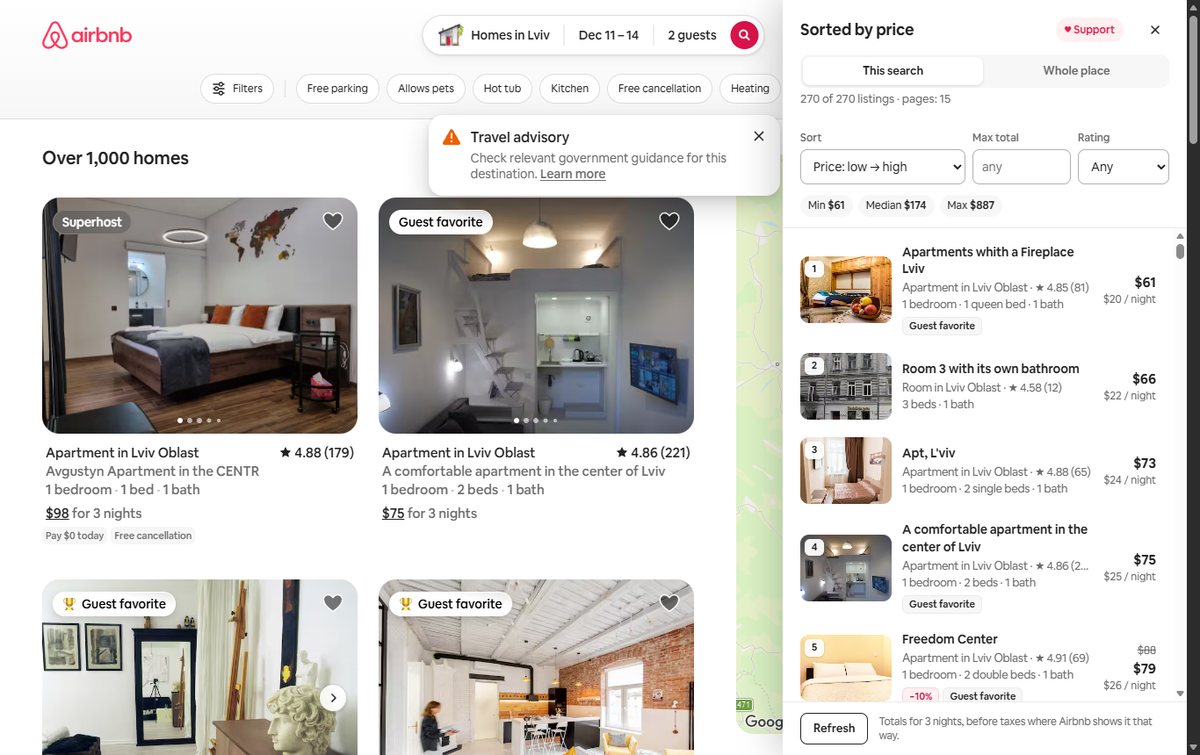
- This search. Collects every page of the current search (Airbnb serves up to ~270 listings) and lists them from cheapest.
- Whole place. Type a city, village, region or country and the extension collects every listing in it, past the 270 cap. It does this by cutting the map into squares until each one fits under the cap. Dates, guests and filters come from your search.
- Sorting and filters: total or per-night price, rating, discount; max total and minimum rating.
- Stats: minimum, median and maximum price.
- English and Ukrainian, following your browser language.
Prices are shown exactly as Airbnb returns them. If a listing looks absurdly expensive, it's usually a host blocking the dates with a high price.
How to install
- Download and unzip the archive.
- Open
chrome://extensionsand turn on Developer mode. - Click Load unpacked and pick the unzipped folder.
- Open an Airbnb search with dates. The Sort by price button appears at the bottom left.
How it's made
A Chrome extension (Manifest V3) in plain JavaScript. Data comes from the same Airbnb page you're looking at, and requests go from your own browser. Only the place name is sent to OpenStreetMap to get its boundary. The extension is unofficial and not affiliated with Airbnb.