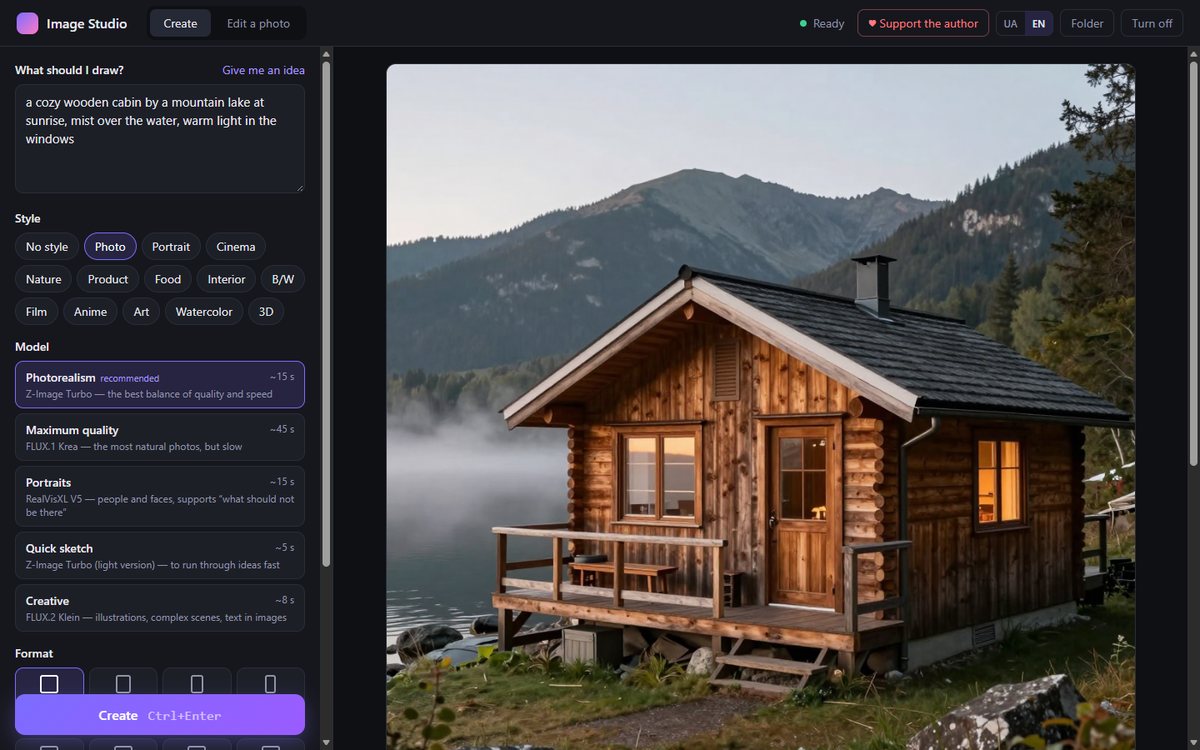
Why
Strong image generation models have been open and free for a while, but they're awkward to use: ComfyUI means wiring dozens of nodes, and online services come with subscriptions and limits. I wanted to just write what I need and get the result on my own computer. So I built Image Studio, an interface on top of ComfyUI that hides all of that.
What it does
- Describe it in any language. Write in your own words; non-English descriptions are translated automatically (you can turn this off).
- Five models for different jobs: photorealism (Z-Image Turbo), maximum quality (FLUX.1 Krea), portraits (RealVisXL), quick sketches and creative work (FLUX.2 Klein).
- Styles and formats: photo, cinema, anime, watercolor and more; square, stories, widescreen.
- Photo editing: “replace the background with the sea”, “make it winter”, combine up to three photos into one.
- Upscaling ×2 with added detail, and ×4.
- A gallery that keeps every image's settings.
- Models download right inside the studio: pick the one you want and it downloads with a progress bar.
- English and Ukrainian.
Requirements
- Windows 10/11 and an NVIDIA graphics card with 8 GB of video memory or more. The “Quick sketch” model needs an RTX 50-series card.
- 20 GB of free space for the app and one model; all models together take about 45 GB.
- Internet for setup and model downloads. After that everything runs locally.
How to install
- Download and unzip the archive.
- Run
install.bat. It downloads ComfyUI (~2 GB), adds Image Studio, creates a desktop shortcut and opens the studio. - In the studio, press “Download” on a model card. “Photorealism” (~11 GB) is a good first choice.
Models are downloaded from Hugging Face. FLUX.1 Krea is licensed for non-commercial use only; the other models have open licences (Apache 2.0, OpenRAIL++).